|
Debug the Therefore™ Rights Server |
Scroll |
This guide shows you how to debug the Therefore™ Rights Server.

1 |
Set Breakpoints in your Therefore™ Rights Server Class |
2 |
Start Therefore™ Server |
3 |
Goto Menu "Tools" or "Debug" --> "Attach To Process" or press CTRL+ALT+P. |
4 |
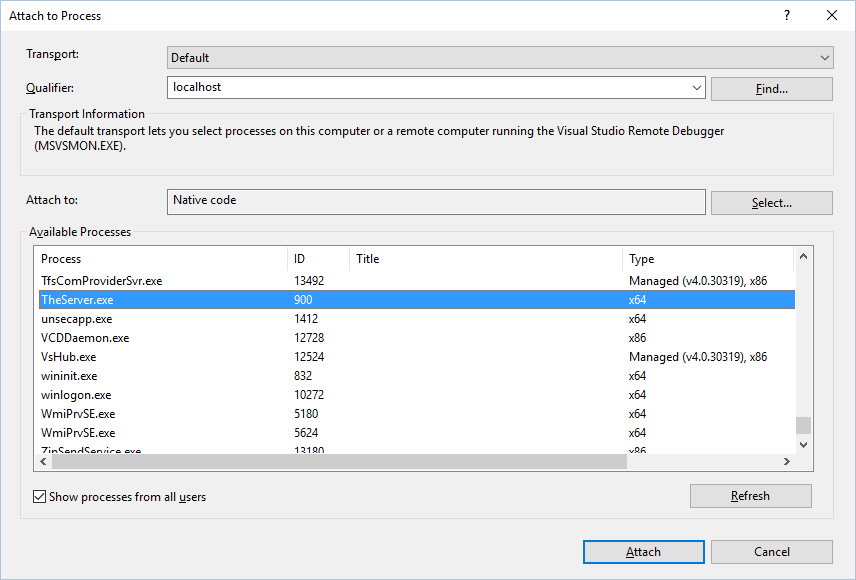
Select TheServer.exe and press Select...
|
5 |
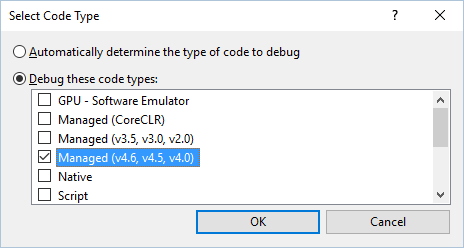
Select Managed (v4.6, v4.5, v4.0)
|
6 |
Select OK and Select Attach |
7 |
Now open the Therefore™ Navigator --> your breakpoints should be called. If not, please check the registry key or any other Therefore™ Error Messages. |