
|
Table Replications |
Scroll |
Table replication was created particularly for Therefore™ Online customers, or Therefore™ systems where the Therefore™ server does not have direct access to the database server. It allows customers to replicate the data to Therefore™ and use it to Create a New Referenced Table.
See the tutorial Creating a Table Replication.
Then, in order for the table replication to work two connections are required:
•Firstly, the Therefore™ Replication Service needs an access to the database. The Therefore™ Replication Service must be installed and running on the source database or alternatively, a client or workstation that has 24/7 access to the source database.
•Secondly, it needs access to Therefore™.
The table below summarizes the options for achieving this.
Account running the Therefore™ Replication Service |
Does NOT have administrator rights on replicated table in Therefore™ |
Has administrator rights on replicated table in Therefore™ |
Has control and delete permissions on external database |
DB Connection: Windows or DB authentication Set Account: Yes |
DB Connection: Windows or DB authentication Set Account: No |
Does NOT have permissions on external database |
DB Connection: DB authentication Set Account: Yes |
DB Connection: DB authentication Set Account: No |
In addition the Windows account used to start the Therefore™ Solution Designer requires at least connect rights on the external database.
Also see the supported column types for a list of fields that can be used with table replication.
A right-click on the object opens a context menu.
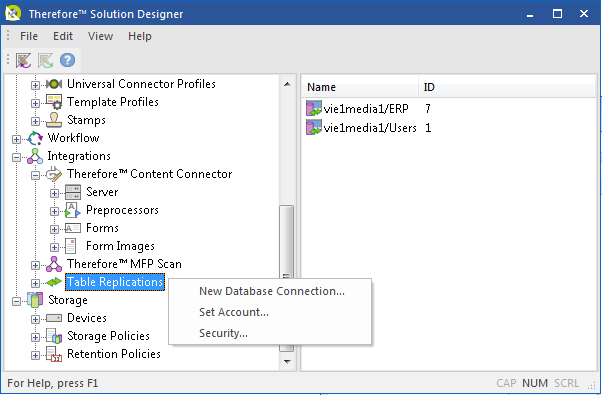
New Database Connection...
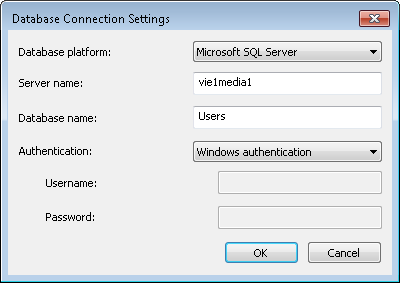
Opens the Database Connection Settings dialog to create a new replication.
|
Database platform: the database platform where the database that is going to be replicated is created.
Server name: the name of the server where the database platform is installed.
Database name: the name of the database.
Authentication: either Windows Authentication or Database Authentication can be used. If Windows authentication is used, the user must have at least following permissions on the database: connect, create table, insert, update and delete. If database authentication is used, a user name and password must be provided.
|
Set Account...
See the Connection Requirements for details on what authentication settings should be used and for details on how and when to use Set Account... Note: The Set Account... setting is grayed out in the case that the user running the Therefore™ Solution Designer does not have enough permissions to write to HKEY_LOCAL_MACHINE in the registry. The account of the Replication Service must also have local administrator privileges.
Security
View and edit role-based access for anything below this node.

