Technical Bulletin for Therefore™ users
26 October 2026
Technical Bulletin for Therefore™ users
Starting with Therefore™ Online v36, Entra ID v2 endpoint is supported. Using it is the recommended method, and it is used by default for all new configurations.
This upgrade is backwards compatible so configurations using Entra ID v1 endpoint will continue working, although upgrading to v2 is recommended.
If users with an existing Entra ID v1 configuration switch to Entra ID v2, additional configuration steps are required. These are listed below according to client type.
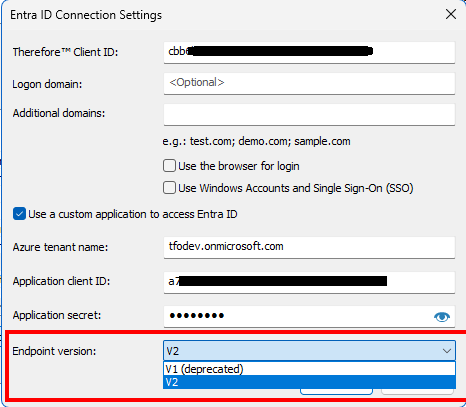
Installed Client
In order to use the same Entra ID account for logging into a Windows user account and Therefore™, a workaround was previously used. It involved using a system browser token for the login process.
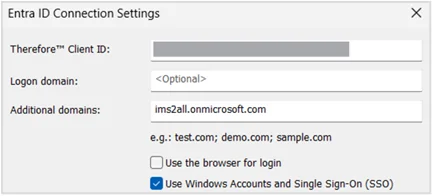
Therefore™ now supports this flow natively.
- Uncheck the option ‘Use the browser for login’
- Instead, check the new option ‘Use Windows Accounts and Single Sign-On (SSO)

- In the Microsoft Entra ID portal, add the following redirect URI under App registration > Authentication settings: ms-appx-web://microsoft.aad.brokerplugin/{Your_Client_ID}
Therefore™ Web Client
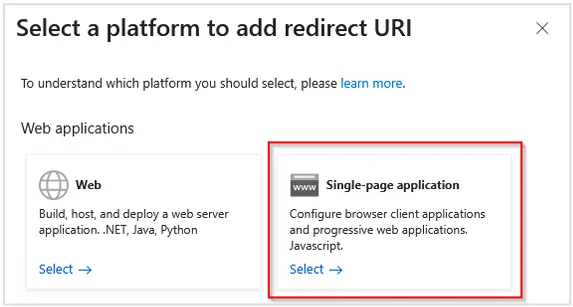
A new redirect URI type is required for the Therefore™ Web Client. In the Microsoft Entra ID portal, select the type ‘Single-page application’ instead of ‘Web’.
Note: No configuration changes are required for the Therefore™ Classic Web Client.
Therefore™ Go
No additional configuration steps are required for the Therefore™ Go mobile application.